
Your accounts are connected. Your algorithms are installed. Now we apply them to every account, enable strategies, and send you to Discord where Oracle will walk you through your first live sessions.
In Step 5, you added the Quaternion strategies to your NQ chart on the sim account. Now we apply them to your live and eval accounts.
For each account you want to trade:
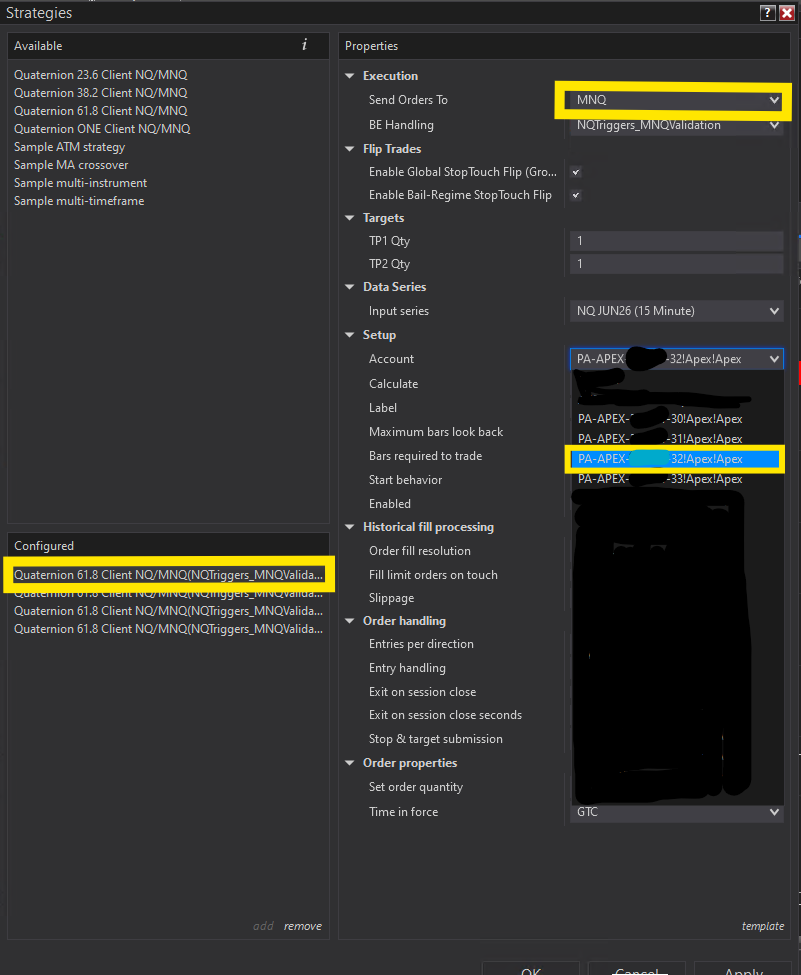
Before clicking OK, verify for each strategy on each account:
If you have multiple eval or PA accounts, you'll apply the same strategies to each one. Each account gets its own set of strategy instances.
Each Quaternion strategy runs independently per account. If you have 4 Apex accounts, you'll have 4 instances of each strategy — 16 strategy instances total across 4 algos. They all run off the same NQ chart data but route orders to each account's MNQ independently.

Open the Strategies tab in the Control Center. You should see:
Check the Log tab for any error messages. If everything is clean, you're good to go.

This is critical — save your workspace so this entire setup is preserved:
File → Save Workspace
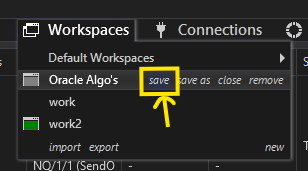
Next time you open NinjaTrader, load your saved workspace and everything will be exactly as you left it — charts, strategies, connections, all of it.
Take one final screenshot showing your complete setup:
Share this screenshot with Oracle on Discord for final verification.
The Quaternion suite is fully automated. Your job is to let it run. Here are the things that will hurt your results:
You can manually close a position if you absolutely need to — nothing will break. But the algorithms are designed to manage every entry, exit, stop loss, and profit target as a unified system. When you intervene on open trades, you're overriding logic that was built to maximize the outcome. In practice, hands-off traders consistently see better results. Trust the system and let it work.
If an algorithm has an open position, disabling it orphans that trade — no stop loss, no profit target, no management. If you need to stop for the day, wait until all positions are flat.
The algorithms ship pre-tuned with settings refined across thousands of hours of market data. It's tempting to tweak inputs after a red day — resist the urge. Constant parameter changes destroy the statistical edge faster than anything else. Pick a plan, commit to it, and give it time to play out. If something genuinely looks wrong, ask Oracle on Discord before touching anything.
If your internet drops while an algo has an open position, your stop loss won't fire until the connection comes back. That's real money at risk. Run the algorithms on stable WiFi, a wired ethernet connection, or a VPS — anything reliable. If your home internet is spotty, a VPS (Step 3) eliminates the problem entirely.
If you're unsure about something, don't touch it. Ask Oracle on Discord first. There's no question too basic. That's what we're here for.
Your algorithms are installed, your accounts are connected, and your strategies are live. The Quaternion suite is ready to trade. Now let's get you into the community.
Discord is your command center. Oracle is there every trading day to:
You'll get access to #algo-trades, #support, and direct messages with Oracle.
Here's what to expect so nothing catches you off guard.
The Quaternion strategies are selective by design. Some days, one or more algos won't find a qualifying setup and will sit out. This is the edge working — not a problem. A "no trade" day means the algo protected your capital by staying flat when conditions didn't meet its criteria.
No algorithm wins every trade. You will see losing days — sometimes multiple in a row. This is normal. The edge plays out over weeks and months, not individual sessions. Don't panic-disable after a red day. That's the fastest way to destroy a statistical edge.
You might check Discord and see a trade already opened and closed. Some trades last minutes. The algos don't wait for you to be watching — they execute the moment conditions are met. If you want real-time notifications, make sure your Discord notifications are on for #algo-trades.
The hardest part of running algorithms isn't the setup — it's the discipline to let them run. You've done the hard part. Now your job is to show up, make sure your connections are green, and let the Quaternion suite do what it was built to do.
You did the work. You followed every step. Now the algorithms go to work for you.
See you on Discord.